

Small business owners hear about AI everywhere, but figuring out where it actually fits into a normal workday can be confusing. The good news is that you don’t need to be technical, replace the tools you already use, or build complicated AI systems to benefit from it.
In this guide, you’ll learn how to use AI for small business through 15 practical examples—from responding to customers and following up with leads to creating content and automating repetitive work. Start with one task that takes too much of your time, then expand from there.
Table of Contents
How to Use AI for Small Business Without Making It Complicated
Using AI in a small business does not mean replacing employees or building complicated software. In most cases, it means using AI to help with everyday tasks you already do—writing emails, organizing information, answering common questions, following up with leads, creating content, or deciding what needs your attention first.
The easiest way to start is to look for work that is repetitive, time-consuming, or easy to forget. AI can help you do that work faster while you stay in control of the final decision.
For additional guidance on the benefits and risks of AI, the U.S. Small Business Administration also provides resources for small businesses exploring AI.
Start with one repetitive task. Let AI help with that task first, then expand only when it actually saves you time.
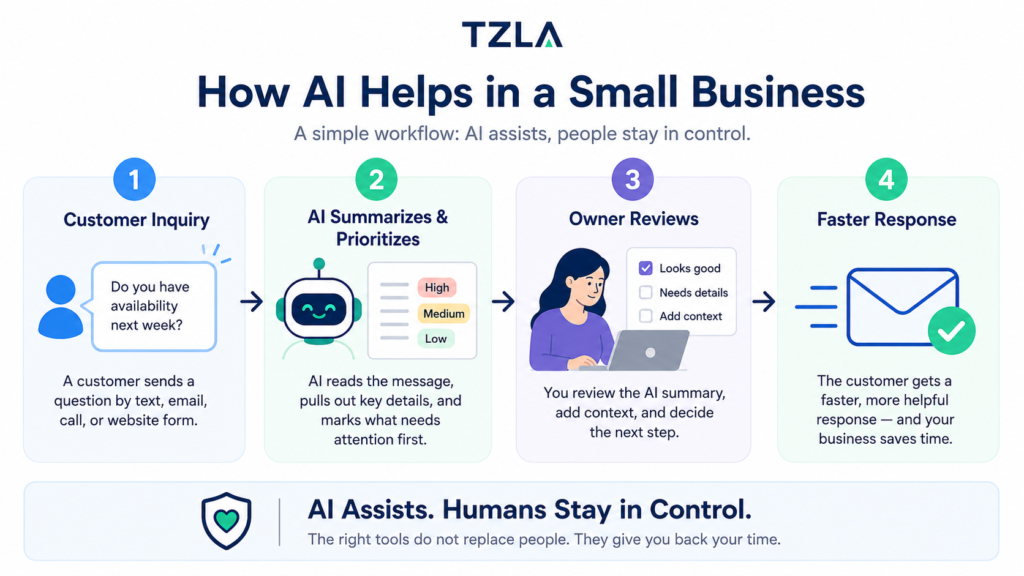
1. Respond to Customer Emails Faster
Customer emails can pile up quickly, especially when you are busy running the business. AI can help you draft clear replies, summarize long messages, and suggest responses to common questions so you spend less time staring at your inbox.
You still review the message before sending it, but AI gives you a strong first draft. That works especially well for appointment questions, basic service inquiries, follow-ups, and requests for information.
Simple example: A customer asks whether you service their area. AI drafts a polite response based on the service-area information you provide.
2. Identify Important Messages First
Not every email or message needs the same level of attention. AI can help sort incoming messages and highlight the ones that look urgent, important, or likely to become a new customer.
This is useful when you are getting messages from several places and do not have time to read everything immediately. AI can help you focus on the conversations that need you first.
Simple example: A customer reports an active water leak while another customer asks about pricing for a future project. AI can flag the leak as the higher-priority message.
3. Respond to New Leads Faster
When someone contacts your business for the first time, speed matters. AI can help create an immediate, professional acknowledgment so the customer knows their request was received even if you are busy, driving, on a job, or away from your computer.
The goal is not to let AI make promises or schedule work on its own. It should simply confirm the request, recognize what the customer needs, and let them know someone from the business will follow up.
Simple example: A homeowner submits a request for a roof inspection. AI immediately sends a short acknowledgment, summarizes the request for the owner, and saves the lead for follow-up.
4. Follow Up With Leads Automatically
Many leads go cold simply because nobody follows up at the right time. AI can help remind you which leads need attention and prepare follow-up messages so you do not have to remember every conversation yourself.
This works best when AI supports the follow-up process instead of taking complete control. You can review the message, adjust it if needed, and send it when the timing makes sense for your business.
Simple example: A potential customer asked for an estimate three days ago but has not responded. AI can flag the lead for follow-up and draft a short, friendly message asking whether they have any questions.
5. Reconnect With Old Leads
Old leads are often one of the easiest opportunities to recover because those people already showed interest in your business. AI can help review past inquiries, identify leads that may be worth contacting again, and draft personalized follow-up messages based on what they originally asked about.
This can be especially useful when you have a spreadsheet, CRM, or inbox full of older requests that were never fully closed out. Instead of starting from scratch, you can use AI to help organize and prioritize who to contact first.
Simple example: A customer asked about replacing a roof six months ago but never booked the job. AI can surface that lead and draft a short message asking whether they still need help with the project.
6. Draft Estimates and Proposals Faster
Creating estimates, proposals, and follow-up documents can take a surprising amount of time, especially when much of the wording is similar from one customer to the next. AI can help turn your notes into a clear first draft that you can review and customize before sending.
The important part is to keep pricing, scope, deadlines, and commitments under your control. AI should help organize and write the document, not make business decisions for you.
Simple example: You enter a few notes about a customer’s project, and AI turns them into a professional estimate summary with the scope of work, next steps, and a clear customer-friendly explanation.
7. Answer Common Customer Questions
Small businesses often answer the same questions again and again—service areas, business hours, pricing ranges, appointment policies, what to expect, or how a process works. AI can help draft consistent answers so you do not have to rewrite the same response every time.
The safest approach is to give AI approved business information and use it to prepare responses from that information. That keeps the answers helpful without letting AI invent details, prices, or promises.
Simple example: A customer asks whether you work in their neighborhood and how soon someone can follow up. AI drafts a response using your actual service-area information and your approved response policy.
8. Summarize Calls and Meetings
Calls and meetings often contain useful details that are easy to forget once the day gets busy. AI can help turn notes or transcripts into a short summary with the key points, decisions, questions, and next steps.
You still review the summary before relying on it, especially when the conversation includes important commitments, dates, pricing, or customer requests. AI should help you organize what was discussed, while you confirm the details that matter.
Simple example: After a 20-minute customer call, AI turns the notes into a short summary with the customer’s main request, important details, and the next action you need to take
9. Create Social Media Content Faster
Creating posts for social media can take more time than expected, especially when you are trying to think of something useful to say while also running the business. AI can help turn simple ideas, customer questions, project updates, or photos into clear social posts that sound professional.
The best results come when you give AI real details from your business instead of asking it to create generic marketing content. You should still review the final post so it sounds like you and accurately represents the work.
Simple example: You upload a photo from a completed job and provide a few notes. AI turns that into a short Facebook or Instagram post explaining what was done and why the project mattered.
10. Respond to Customer Reviews
Customer reviews deserve a response, but writing a thoughtful reply to every review can become another task on a busy schedule. AI can help draft professional responses that thank customers for positive feedback or acknowledge concerns in negative reviews.
You should always review the response before posting, especially when a customer is unhappy. AI can help with the wording, but sensitive complaints and disputes still need human judgment.
Simple example: A customer leaves a five-star Google review mentioning great service and communication. AI drafts a short, personalized thank-you response based on what the customer actually wrote.
11. Research Products, Vendors, and Business Questions
Small business owners spend a lot of time researching products, suppliers, software, competitors, and everyday business questions. AI can help organize that research, compare options, summarize information, and identify questions you may want to investigate further.
AI can speed up the research process, but important information such as pricing, contracts, regulations, and product specifications should still be verified with reliable sources before making a decision.
Simple example: You are comparing three scheduling tools for your business. AI can organize their features, differences, and potential advantages into a simple comparison so you can evaluate the options faster.
12. Create Instructions and Standard Operating Procedures
Many small businesses rely on processes that exist mostly in the owner’s head. AI can help turn rough notes, voice transcripts, or a simple explanation of how you do something into clear step-by-step instructions that employees can follow.
You should review the final instructions for accuracy, but starting with an AI-generated draft can make documenting everyday processes much faster and easier.
Simple example: You explain how you onboard a new customer in a voice note. AI turns your explanation into a step-by-step checklist that you can review, correct, and give to an employee to follow.
13. Organize Spreadsheet and Business Data
Spreadsheets often become messy as customer information, leads, expenses, inventory, or project details accumulate. AI can help clean up information, categorize entries, summarize patterns, and turn raw data into something easier to understand
You should still verify important numbers and customer information, but AI can reduce the time spent manually sorting through rows of data and help you identify what deserves your attention.
Simple example: You have a spreadsheet containing hundreds of customer inquiries. AI can help categorize them by service requested, summarize common questions, and identify leads that may need follow-up.
14. Turn Notes and Ideas Into Action Items
Good ideas often get buried in notebooks, emails, voice notes, and meeting notes because there is not enough time to organize everything afterward. AI can help turn those unstructured notes into a clear list of tasks, priorities, and next steps.
This is especially useful for busy owners who think through problems while working, driving between jobs, or talking with customers. Instead of manually reorganizing everything later, AI can help create a usable action list.
Simple example: You record several ideas after meeting with a customer. AI turns the notes into a short task list showing what needs to be done, what needs follow-up, and which items can wait.
15. Automate Repetitive Workflows
Once you find tasks that happen the same way again and again, AI can become even more useful when combined with automation. Instead of manually moving information between your email, forms, spreadsheets, and other business tools, an automated workflow can handle some of those steps for you.
Start small and keep a person involved where judgment matters. A good first automation should solve one clear problem, be easy to understand, and save enough time that you immediately notice the difference.
Simple example: A new customer submits a service request. The system saves the lead, uses AI to summarize and prioritize the request, sends the customer an acknowledgment, and alerts the business owner when follow-up is needed.
What Should You Use AI for First?
With so many ways to use AI, it is easy to try too much at once. A better approach is to start with one task that repeatedly takes time away from running your business.
Look for something you do several times each week that follows a fairly predictable process. Customer follow-ups, answering common questions, organizing leads, summarizing information, or drafting routine messages are often good places to start.
Ask yourself these three questions:
Use a List block for these:
- What task do I repeat over and over?
- What task takes time but does not require my judgment every step of the way?
- What task would I happily stop doing manually if I could still review the result?
You do not need to transform your entire business. If AI saves you 15 minutes on one task every day, that is already more than an hour of your time back each week. Once that first use works reliably, you can decide whether another task is worth improving.
Don’t “adopt AI.” Solve one annoying problem with AI.
What Should AI NOT Do for Your Small Business?
AI can save time, but that does not mean every business decision should be automated. The more a task involves money, safety, sensitive information, legal obligations, or promises to customers, the more important human review becomes.
- Make important financial or legal decisions for you
- Diagnose safety-critical problems without qualified human review
- Invent prices, policies, appointment times, or service availability
- Make promises to customers that your business has not approved
- Send sensitive information without appropriate safeguards
- Automatically handle serious complaints or disputes without your review
- Replace your judgment when a situation is unusual or unclear
A useful rule is simple: let AI handle repetitive work and preparation, while you stay responsible for important decisions. The goal is not to remove the business owner from the process. It is to remove unnecessary busywork.
A Simple AI Starter Toolkit for Small Business
You do not need dozens of AI subscriptions to get started. For most small businesses, a few well-chosen tools are enough to handle writing, research, customer communication, and basic automation.
ChatGPT — Everyday AI Assistant
ChatGPT can help draft emails, summarize information, brainstorm ideas, create instructions, analyze documents, and work through everyday business questions. For many owners, it is one of the easiest places to start experimenting with AI.
Claude — Writing and Document Work
Claude is another general-purpose AI assistant that can help with writing, research, document analysis, brainstorming, and organizing complex information. Trying both ChatGPT and Claude can help you decide which one fits the way you work.
Zapier — Connect and Automate Your Tools
Zapier connects apps you already use and can automate repetitive steps between them. For example, a new customer inquiry can be saved to a spreadsheet, analyzed with AI, and routed to the right person without manually copying information between systems.
Your Existing Business Tools
Before adding new software, look at the tools you already use. Email, calendars, spreadsheets, forms, accounting software, and customer-management systems increasingly include AI features or can connect to AI automation tools.
Start with the problem, not the tool. Choose something you want to improve first, then decide which AI tool can help you solve it.
A 7-Day AI Starter Plan for Your Small Business
You do not need to change your entire business in a weekend. Spend one week experimenting with AI on a small scale and focus on finding one use that genuinely saves you time.
Day 1: Find One Repetitive Task
Write down three tasks you repeatedly do each week. Choose the one that takes time but follows a fairly predictable process.
Day 2: Try the Task With AI
Use an AI assistant to help with that task. Keep the first experiment simple and compare the result with how you normally do the work.
Day 3: Improve Your Instructions
If the first result is not quite right, give AI better context and clearer instructions. Explain what your business does, what outcome you want, and what the AI should avoid doing.
Day 4: Create a Repeatable Process
Save the instructions that worked well so you do not have to start from scratch each time. Turn them into a simple template your business can reuse.
Day 5: Look for an Automation Opportunity
Ask whether part of the process could happen automatically. Look for repetitive steps such as copying information, sending acknowledgments, organizing leads, or creating reminders.
Day 6: Test Before You Trust
Run the process several times using realistic examples. Check the results carefully and make sure important decisions still receive human review.
Day 7: Measure Whether It Actually Helped
Ask one question: did this save meaningful time or make the work easier? If yes, keep it and improve it. If not, try a different task instead of adding more complexity.
After seven days, you do not need an “AI-powered business.” You only need one useful process that works better than it did before. That is a much stronger foundation for adopting AI than subscribing to a collection of tools you rarely use.
Frequently Asked Questions About AI for Small Business
Can a small business use AI without technical experience?
Yes. Many useful AI tools are designed to work through normal conversations, email, spreadsheets, forms, and other familiar software. Start with a simple task and learn only what you need to solve that particular problem.
What is the easiest way to start using AI in a small business?
Start with one repetitive task you already understand well. Drafting routine emails, summarizing information, creating follow-up messages, or organizing customer inquiries are good examples. Test the result yourself before making the process automatic.
What are the best AI tools for small businesses?
There is no single best tool for every business. General-purpose assistants such as ChatGPT and Claude can handle many writing, research, and information tasks, while automation platforms such as Zapier can connect AI with other business tools. The right choice depends on the problem you are trying to solve.
How much does AI cost for a small business?
AI can automate parts of a business, but fully automating everything is usually neither necessary nor desirable. Repetitive processes are better candidates for automation, while important decisions, unusual situations, customer disputes, and sensitive work should continue to involve human judgment.
Is AI safe for small businesses?
AI can be used safely when businesses apply appropriate controls. Avoid entering sensitive customer or company information into tools without understanding how that data is handled, review important AI-generated work, and use trusted services with security and privacy practices appropriate for your business.
Will AI replace employees in a small business?
AI is often most useful as a tool that helps people work faster rather than as a complete replacement for employees. It can handle drafts, summaries, repetitive administration, and routine processing while people focus on customer relationships, judgment, skilled work, and decisions.
Start Small, Learn What Works, and Let AI Handle More Over Time
AI does not need to completely change the way you run your business. The best place to start is with one task that takes too much time, happens repeatedly, or is easy to forget.
Once AI helps with that task reliably, you can look for the next opportunity. Over time, small improvements in customer communication, lead follow-up, research, writing, and everyday administration can add up to meaningful time savings.
The goal is not to become an AI expert. The goal is to spend less time on repetitive work and more time running your business, helping customers, and making decisions that actually need you.
TZLA is built around that idea: practical AI for people who want the benefits without having to become technical. We explain AI in simple terms, show real business use cases, and build tools and automation that make everyday work easier.
Want to keep learning? Explore our AI guides, practical tools, and automation resources to find the next simple way AI can improve your business.